01Step
Deschideți spațiul de lucru
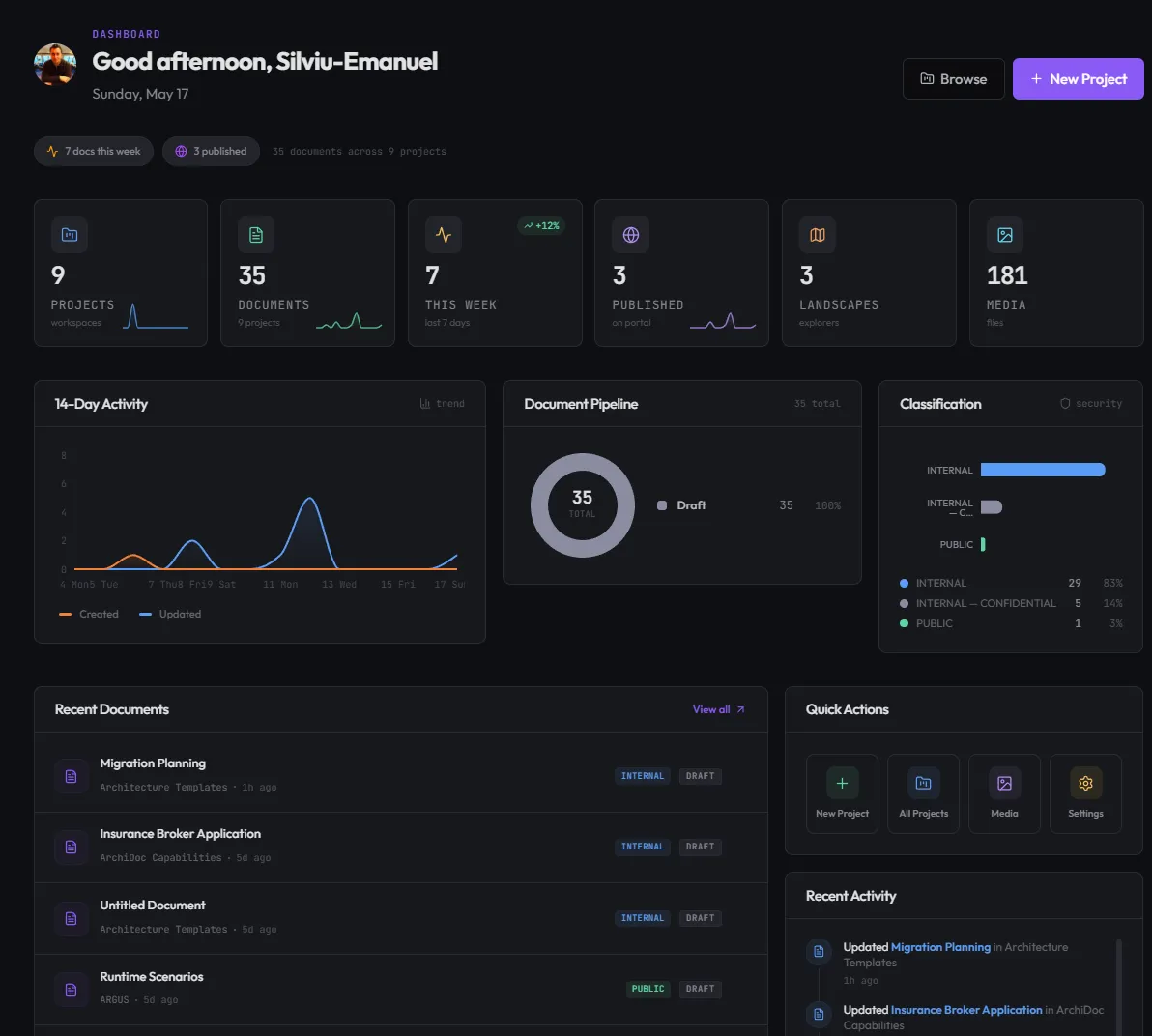
Fiecare spațiu de lucru adună documente, entități, framework-uri și revizuiri într-un singur loc. Tabloul de bord arată ce este publicat, ce este în revizuire și ce necesită atenție.
Studio este spațiul de lucru cu care FINTEXIS proiectează, documentează și guvernează arhitectura enterprise — blocuri vii, un graf interactiv al spațiului de lucru și un Architecture Review Board integrat.
Pe scurt
De ce l-am construit
Orice echipă de arhitectură enterprise întâlnește aceleași trei probleme. Studio le rezolvă într-un singur loc.
Deciziile de arhitectură rămân în slide-uri pe care nimeni nu le mai deschide o lună mai târziu. Studio păstrează fiecare decizie găsibilă, versionată și legată de codul pe care îl modelează.
Confluence devine un cimitir. Studio dă fiecărui concept — entitate, cerință, decizie, framework — un loc tipizat, cu legături încrucișate.
Solicitările către ARB se rătăcesc prin e-mailuri. Studio trece fiecare modificare printr-o revizuire structurată, cu adnotări ale revizorilor și registru de decizii.
Ce este Studio
Documente vii, un graf interactiv al spațiului de lucru și un Architecture Review Board integrat — suprafața pe care lucrează zilnic proprii noștri arhitecți.
01 · Documente vii
Studio înlocuiește paginile plate cu blocuri componibile. Fiecare bloc are tema și comportamentul lui și se randează identic în editor și în pagina publicată — ce văd revizorii văd și cititorii.
02 · Graful spațiului de lucru
Studio reprezintă entități, servicii și dependențe ca un graf JointJS navigabil. Un clic pe orice nod deschide documentul aferent. Filtrați după domeniu, framework sau stare de revizuire.
03 · Flux ARB
Trimiteți o modificare. Revizorii adnotează în linie pe documentul randat efectiv. ARB decide. Decizia rămâne acolo unde trăiește modificarea — permanent.
Cum decurge
Derulați printr-o sesiune reală de redactare — de la deschiderea spațiului de lucru până la documentul publicat. Fiecare ecran provine din versiunea curentă a FINTEXIS Studio.
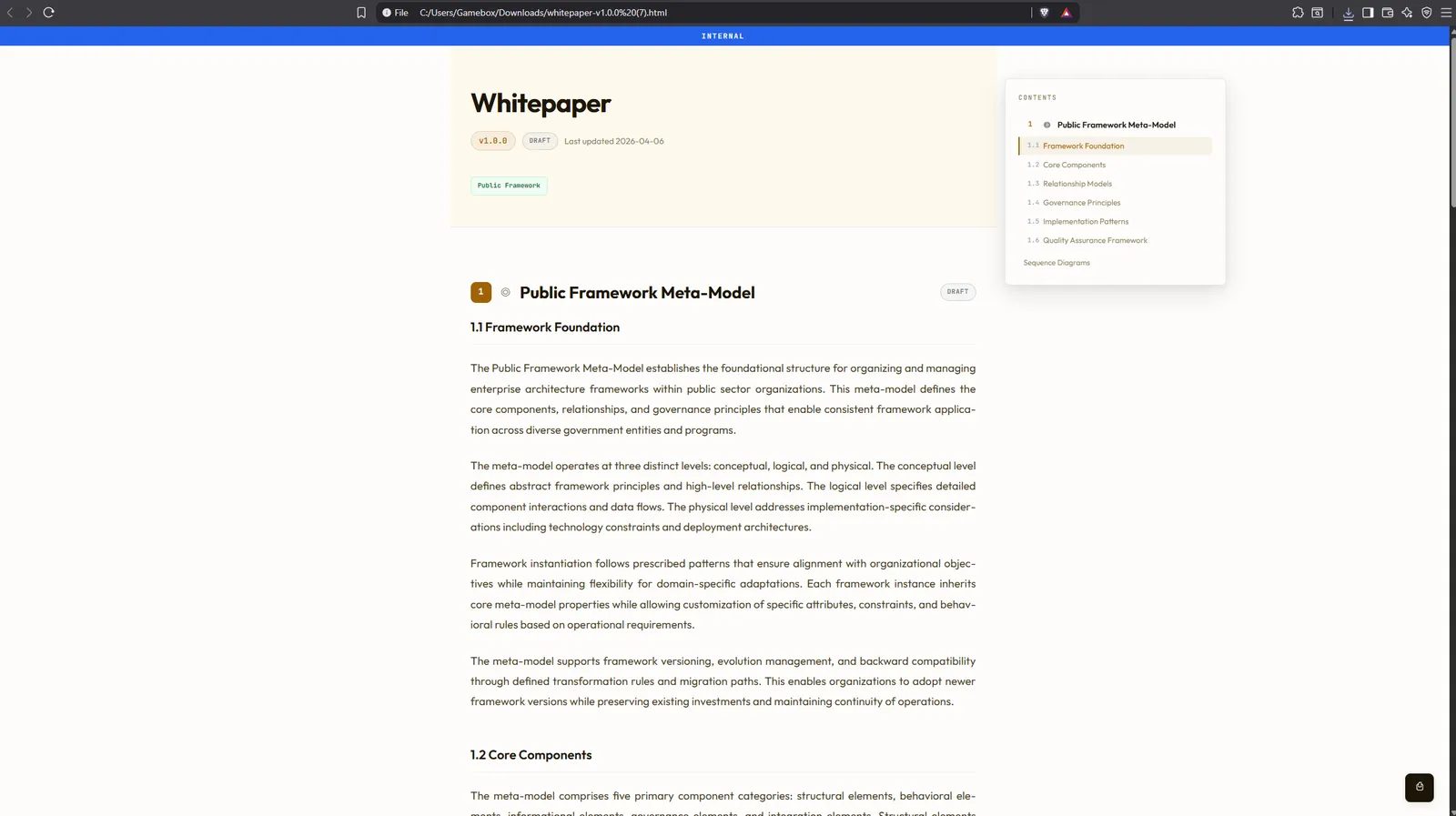
Fiecare spațiu de lucru adună documente, entități, framework-uri și revizuiri într-un singur loc. Tabloul de bord arată ce este publicat, ce este în revizuire și ce necesită atenție.
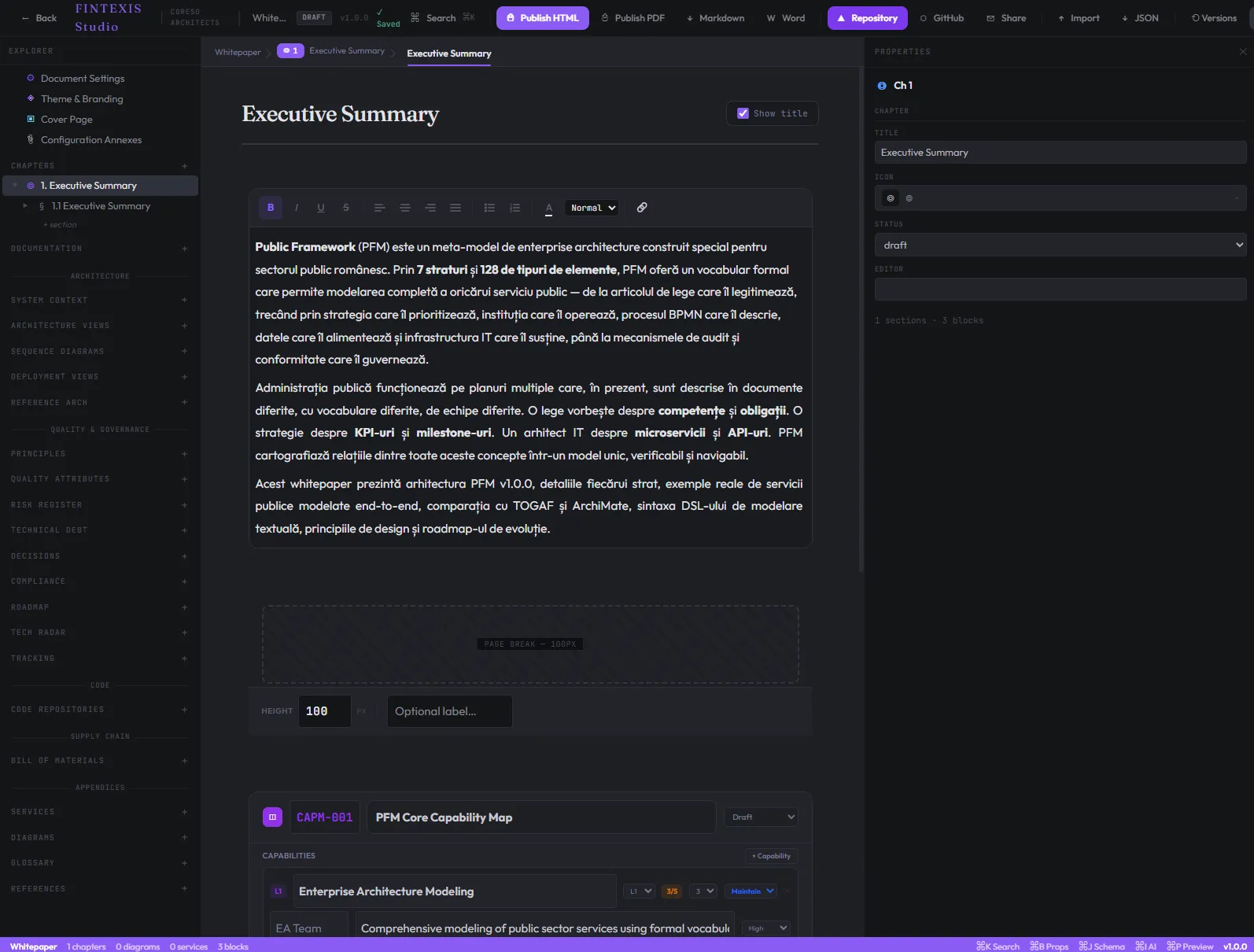
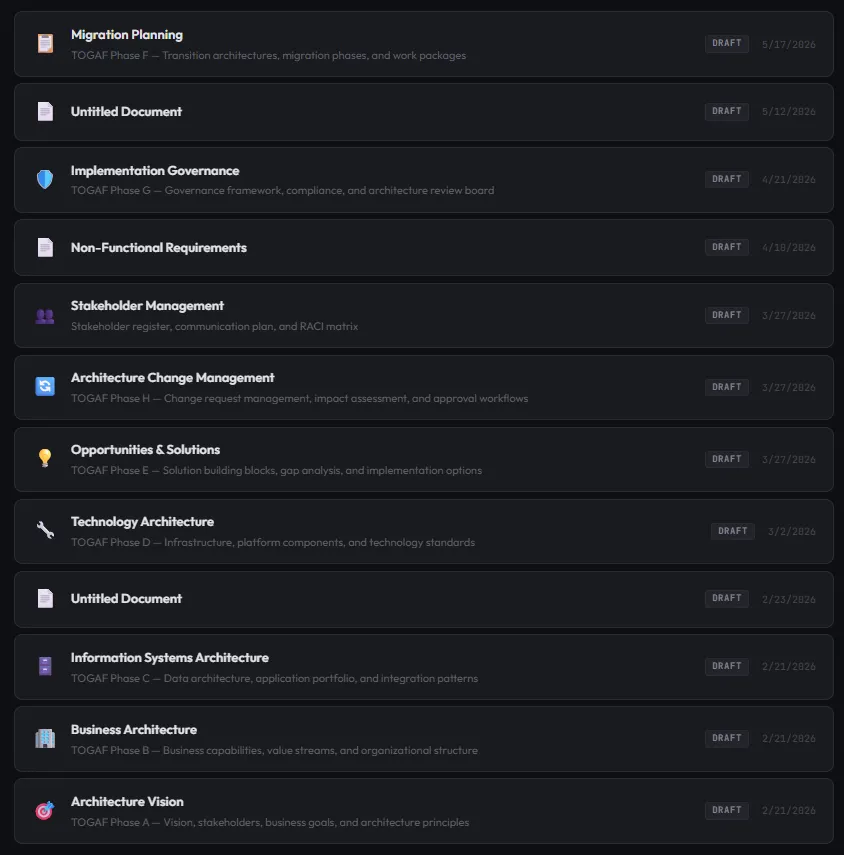
Alegeți dintre ADR, Service Spec, Entity Definition, Domain Map, NFR Sheet, Threat Model, Capability Map sau Integration Spec. Cadrul este precompletat, iar structura de blocuri corespunde tipului de document.
Editorul randează blocurile pe măsură ce scrieți — titlu, cod, casetă, framework, referință de entitate. Fiecare bloc își impune propria structură, astfel încât conceptele de arhitectură să fie tratate ca atare.
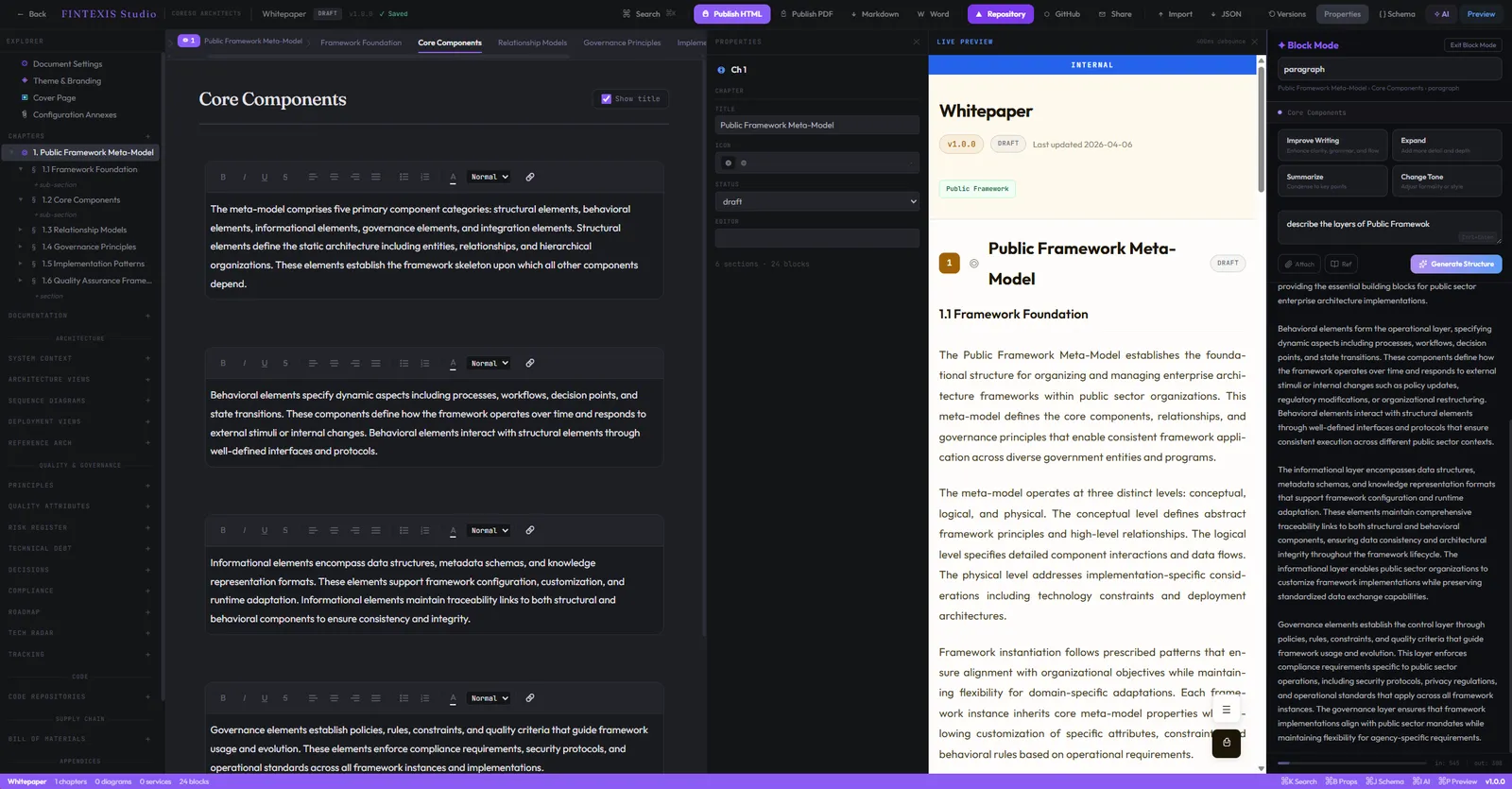
Compuneți blocuri în stânga, vedeți-le randate în timp real în dreapta. Cereți panoului AI ajutor pentru formulare, pentru redactarea cerințelor sau pentru referințe la framework-uri — fără să părăsiți documentul.
Publicați o pagină HTML îngrijită pe care oricine din organizație o poate citi, sau exportați în PDF gata de tipar, cu aceeași temă. O sursă, două suprafețe.
Vedeți-l în acțiune
Capturi din versiunea curentă a FINTEXIS Studio. Fiecare bloc, fiecare flux, fiecare export — deja în funcțiune.
Compuneți blocuri în stânga, urmăriți-le randate în timp real în dreapta și cereți ajutorul AI pentru formulare — fără să părăsiți documentul.
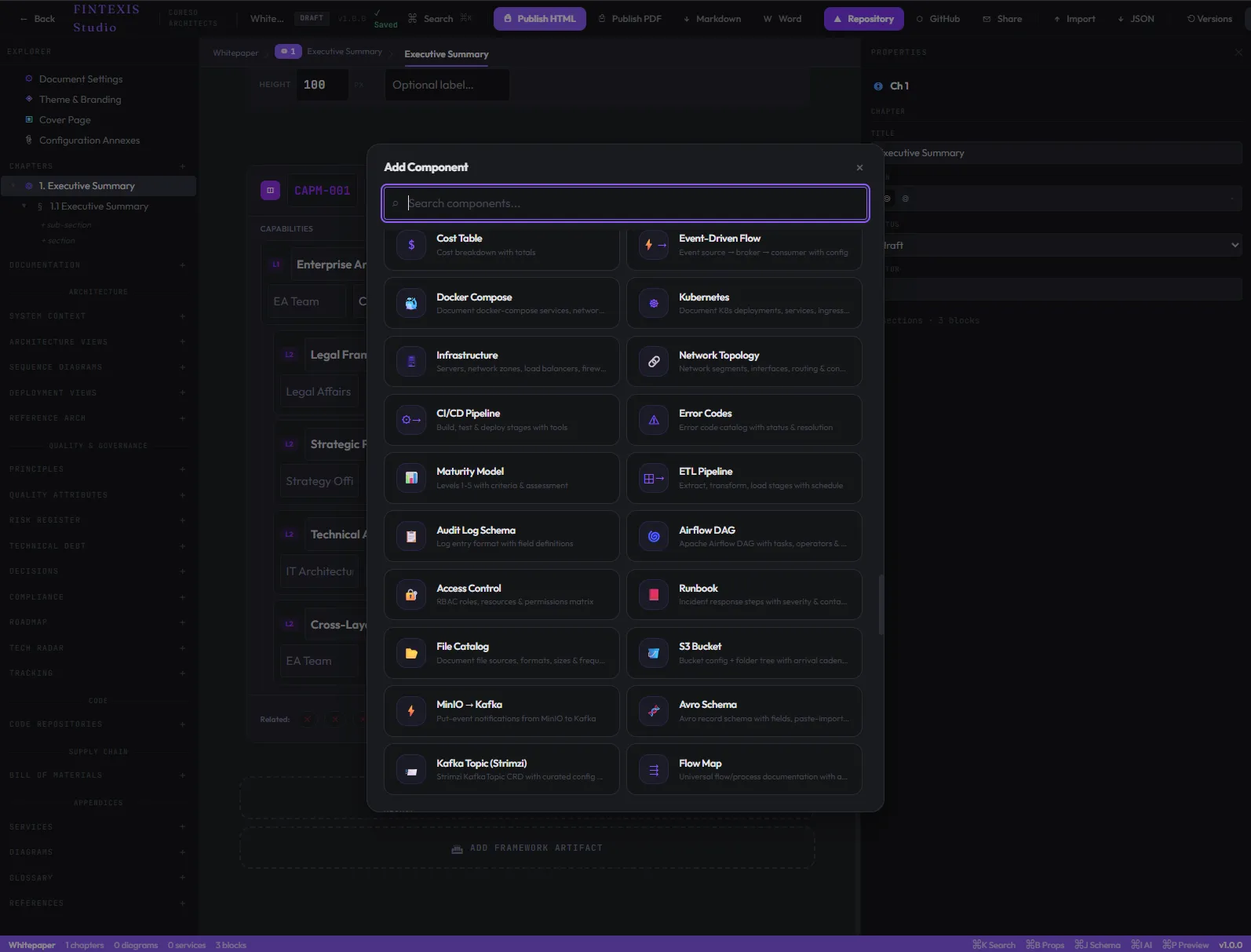
Inserați oricare dintre cele 12 blocuri tipizate în documentul activ.
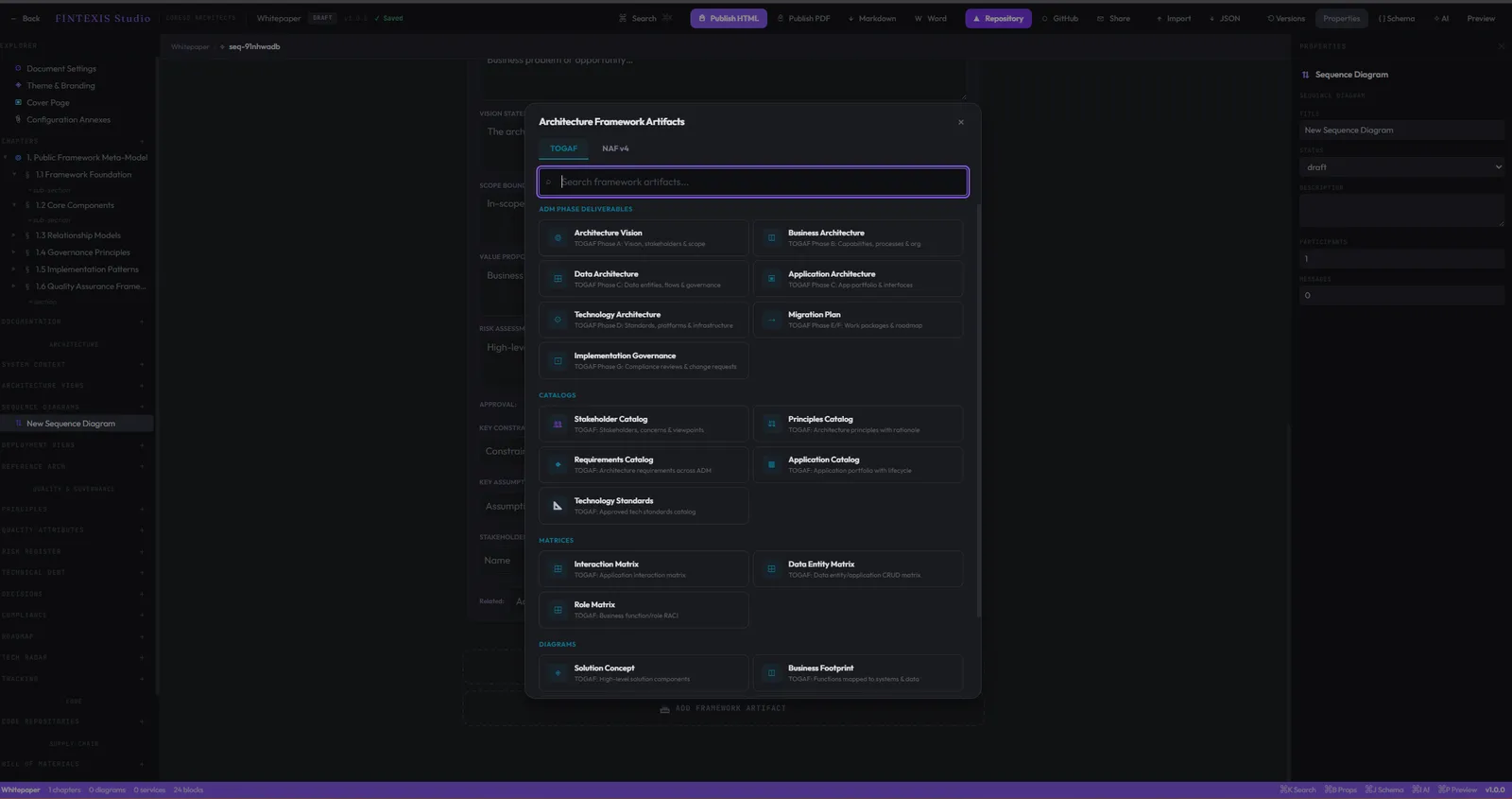
Referențiați tipare de arhitectură reutilizabile din orice punct al spațiului de lucru.
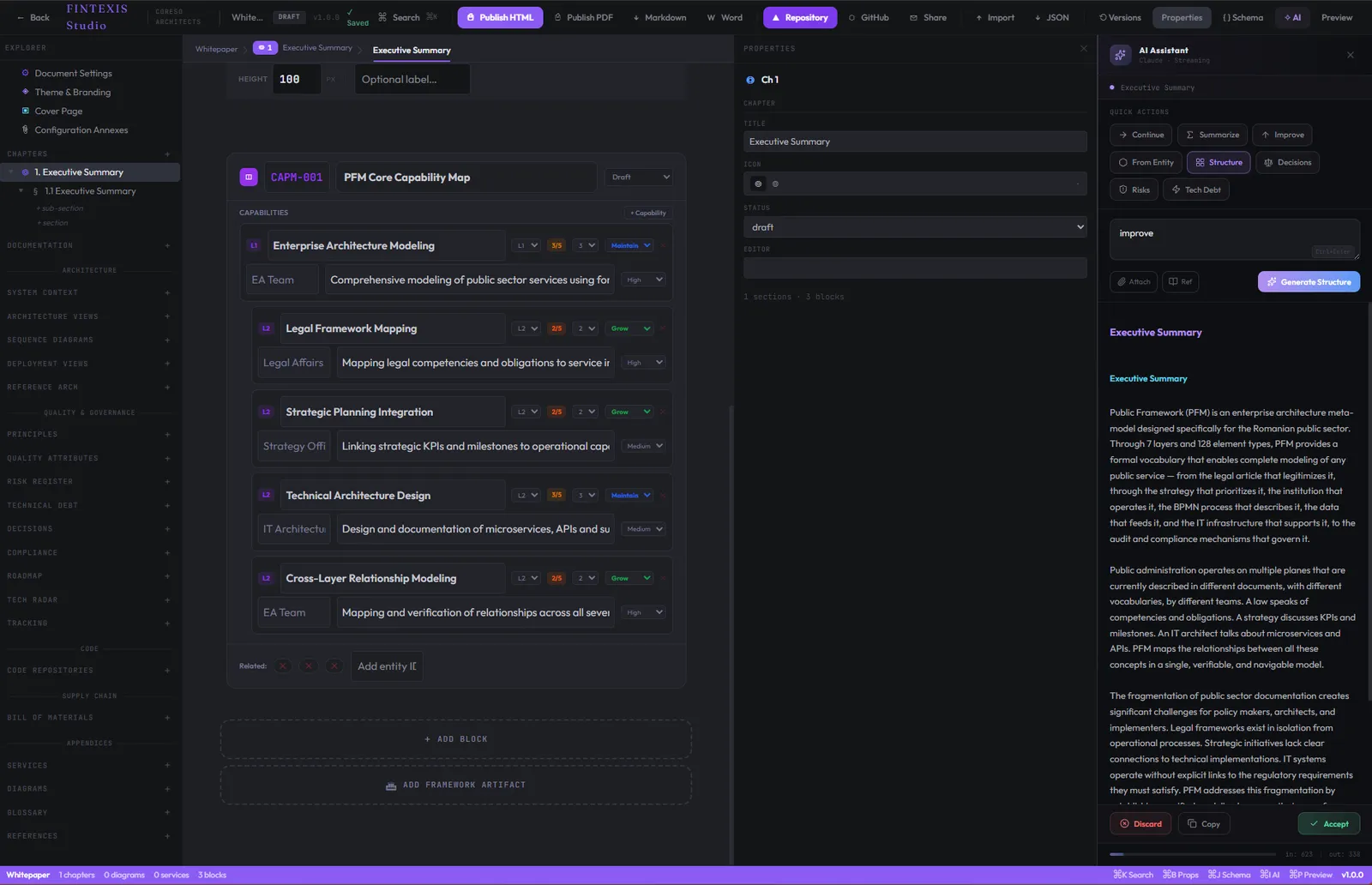
Generați, extindeți și rafinați conținutul blocurilor cu un asistent care înțelege arhitectura.
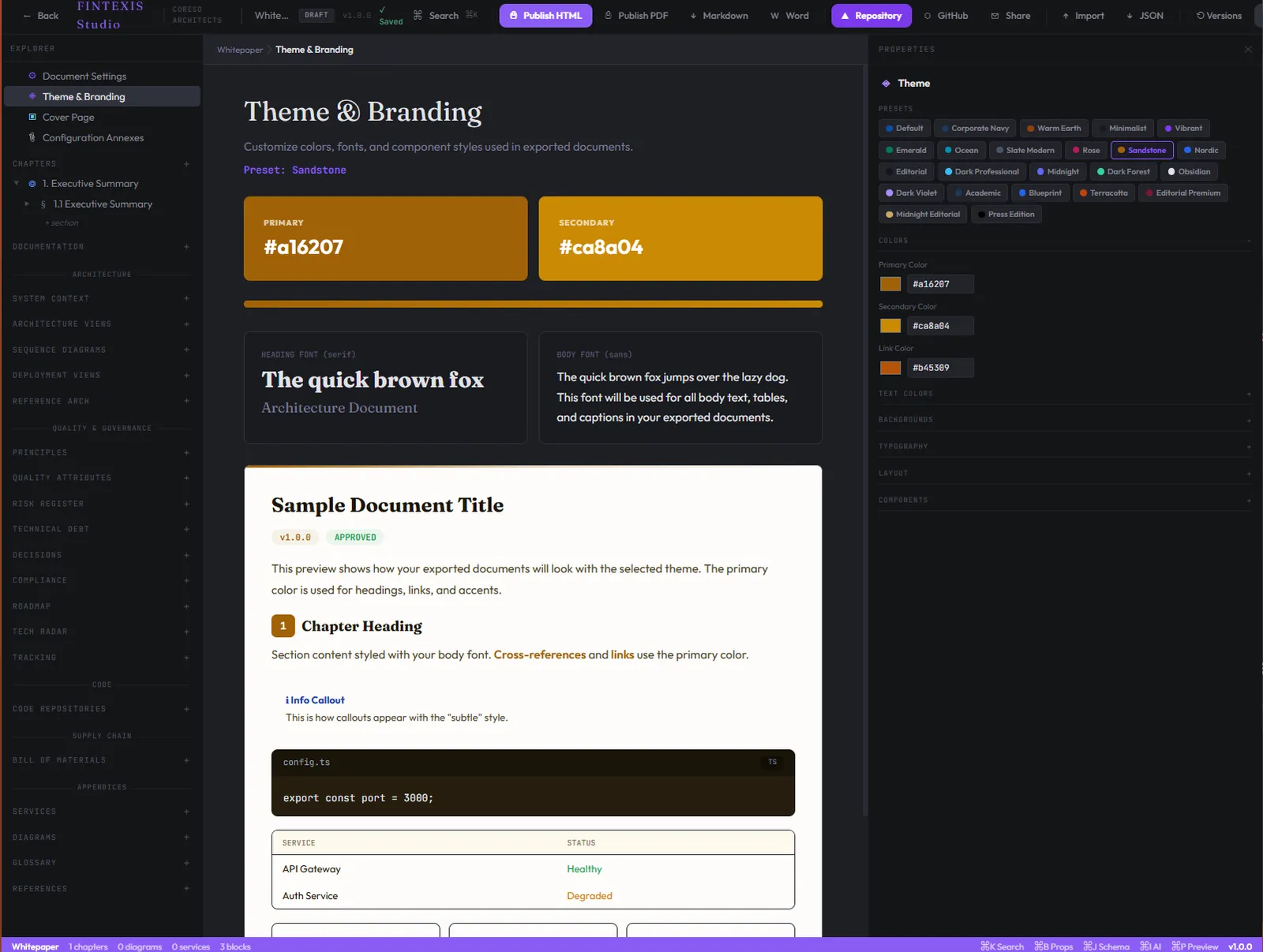
Teme per spațiu de lucru — tipografie, spațiere, culori de brand, stil de randare.
Publicați orice document ca pagină HTML îngrijită și tematizată — partajabilă și indexabilă.
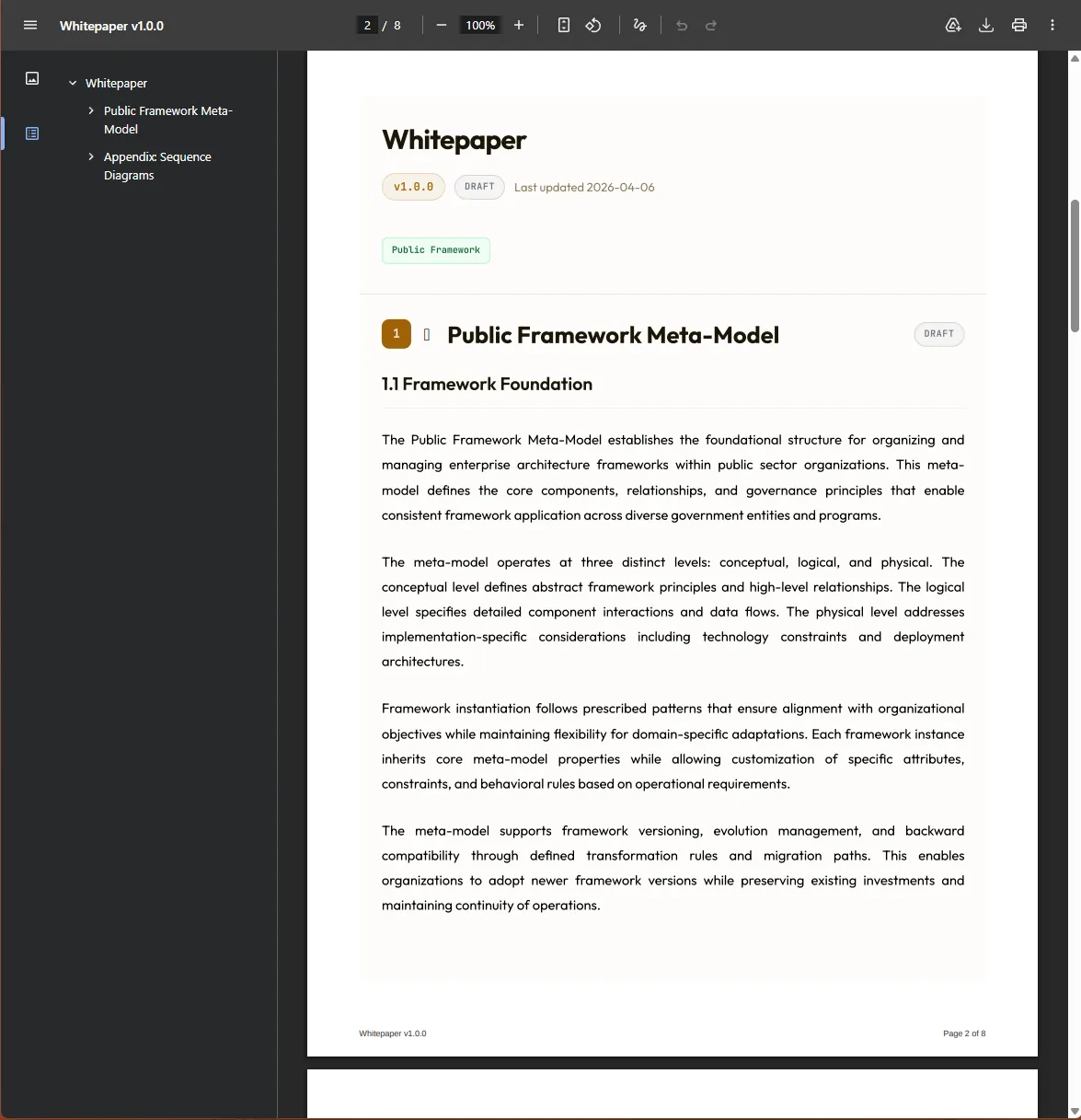
Exportați documentele în PDF gata de tipar, cu aceeași temă ca pagina publicată.
Puncte de plecare
Studio vine cu șabloane pentru tipurile de document care revin în fiecare proiect. Fiecare șablon are cadrul potrivit, structura de blocuri potrivită și traseul de revizuire deja configurat.
Architecture Decision Record — context, decizie, consecințe, alternative analizate.
Suprafața API, dependențe, SLO-uri, responsabilitate și caracteristici de rulare ale unui serviciu.
Entitate de domeniu cu atribute, relații, bounded context și responsabilitate.
Bounded contexts, responsabilitatea entităților și punctele de integrare între domenii.
Cerințe nefuncționale cu criticitate, metodă de măsurare și valori-țintă.
Model de amenințări bazat pe STRIDE, cu active, amenințări, măsuri de atenuare și risc rezidual.
Capabilități de business, sistemele care le realizează și decalajele dintre ele.
Contract API, scheme de mesaje, semantica erorilor și tratarea back-pressure.
Prin ce diferă Studio
Uneltele generaliste au fost proiectate pentru scris generalist. Studio a fost proiectat pornind de la proiectele pe care FINTEXIS le derulează — și se vede în ce modelează, nu doar în ce stochează.
| Capabilitate | FINTEXIS Studio | Confluence | Notion | Backstage |
|---|---|---|---|---|
| Blocuri de arhitectură tipizate | Da | Nu | Nu | Parțial |
| Model de entități cu legături încrucișate | Da | Nu | Nu | Da |
| Trasabilitatea cerințelor | Da | Plugin | Nu | Parțial |
| Graf al dependențelor spațiului de lucru | Da | Nu | Nu | Parțial |
| Flux Architecture Review Board | Da | Plugin | Nu | Nu |
| Adnotări ale revizorilor pe documente randate | Da | Parțial | Parțial | Nu |
| Registru de decizii per document | Da | Nu | Nu | Nu |
| Rezidența datelor în UE, implicit | Da | Configurare | Nu | Configurare |
Pentru cine este Studio
Studio este modelat de rolurile care ating arhitectura zilnic. Fiecare rol primește același spațiu de lucru — dar valoarea se așază diferit.
Hărți de capabilități, modele de domeniu, planuri ale stării-țintă și artefacte de guvernanță într-un spațiu navigabil — cu decizii trasabile și un istoric auditabil.
Service specs, ADR-uri, referințe la framework-uri și documente tehnice cu adnotări ale revizorilor — același spațiu pe care îl citesc inginerii dumneavoastră, scris în aceeași notație.
Documentație vie pe care inginerii dumneavoastră chiar o citesc. Revizuiri care se petrec pe document, nu într-un canal paralel. Decizii legate de codul pe care îl modelează.
Un spațiu de lucru pe care îl ridicați în ziua 0 a unui proiect, îl predați în ziua N, iar clientul îl poate naviga și doi ani mai târziu — pentru că fiecare artefact este tipizat și găsibil.
Încredere și conformitate
Artefactele de arhitectură sunt printre cele mai sensibile documente pe care le produce o organizație. Studio le tratează ca atare — cu rezidența datelor în UE, criptare în repaus și în tranzit, jurnale de audit structurate și o poziție de conformitate gândită pentru sectoarele reglementate pe care le deservim.
Toate datele spațiului de lucru sunt stocate implicit în regiuni din UE. Opțiuni de rezidență specifice sunt disponibile pentru sectoarele reglementate pe care le deservim.
TLS 1.3 în tranzit. AES-256 în repaus. Chei gestionate în servicii de management al cheilor din regiuni UE.
Minimizarea datelor, dreptul la ștergere și acorduri de prelucrare ca standard. Documentație de sprijin pentru DPIA, la cerere.
Autentificare OIDC disponibilă în beta. SAML și provizionarea SCIM pentru Okta și Azure AD sunt următoarele lucrări pe identitate.
Fiecare citire, scriere, revizuire și decizie este consemnată cu actor, marcaj de timp și versiune de document. Exportabil pentru verificări de conformitate.
Ce urmează
O imagine reprezentativă a direcțiilor în care investește Studio. Participanții la beta ne ajută să reprioritizăm.
Întrebări frecvente
Studio este în beta privată. Solicitați acces prin formularul de mai jos — includem echipe noi la fiecare două săptămâni, în funcție de potrivire și capacitate.
Astăzi este găzduit în cloud. Opțiunile self-hosted și on-premises sunt în roadmap pentru clienții din sectoare reglementate (energie, bănci, sector public).
Studio este construit special pentru arhitectură: blocuri tipizate pentru concepte arhitecturale, un graf interactiv al spațiului de lucru și un flux ARB integrat. Wiki-urile generaliste nu modelează arhitectura — Studio o face.
Nu. Studio este un produs de sine stătător. Multe echipe din beta îl folosesc fără să ne contracteze pentru consultanță — deși este același spațiu de lucru pe care îl folosim în proiectele noastre.
Rezidența datelor în UE, implicit. Criptare în tranzit și în repaus. Împărtășim cu plăcere postura noastră de securitate în timpul integrării în beta.
Nu în timpul beta-ului privat. Participanții ne ajută să conturăm modelul de preț. Vom publica prețuri publice la trecerea în beta publică.
Beta privată
Spuneți-ne pe scurt despre echipa dumneavoastră. Includem cohorte noi de beta la fiecare două săptămâni, în funcție de potrivire și capacitate.
Studio este una dintre modalitățile prin care FINTEXIS livrează. Dacă preferați să începeți cu o discuție despre arhitectura dumneavoastră, ne-ar face plăcere să ne scrieți.